FFmpeg 是 Fast Forward Moving Picture Experts Group (快进运动图片专家组) 的缩写,是一种超快音频 视频编码器。
FFmpeg 是领先的开源跨平台多媒体框架,能解码 编码 转码 Mux Demux 流化 过滤和播放由人类 机器创建的几乎所有内容。
FFmpeg 由 AVCodec 音视频编解码器、AVDevice 音视频设备、AVFilter 音视频滤镜、AVFormat 音视频格式、AVUtil 音视频实用工具、swscale 视频图像转换、swresample 音频转换 7 个部分组成。
另请参阅: FFmpeg 4.2.2 中文文档编制 FFmpeg for Linux
基本用法
详细用法
源码编译
媒体格式
视频滤镜
硬编解码
媒体录制
视频转码
音频转码
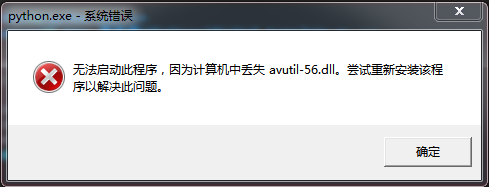
Python ctypes 时,可能出现此提示。
查看所有可用 DirectShow 音视频设备
X:\digital manage\bin>ffmpeg -list_devices true -f dshow -i dummy
ffmpeg version N-94335-g9869e21776 Copyright (c) 2000-2019 the FFmpeg developers
  built with gcc 9.1.1 (GCC) 20190716
  configuration: --enable-gpl --enable-version3 --enable-sdl2 --enable-fontconfig --enable-gnutls --enable-iconv --enable-libass --enable-libdav1d --enable-libbluray --enable-libfreetype --enable-libmp3lame --enable-libopencore-amrnb --enable-libopencore-amrwb --enable-libopenjpeg --enable-libopus --enable-libshine --enable-libsnappy --enable-libsoxr --enable-libtheora --enable-libtwolame --enable-libvpx --enable-libwavpack --enable-libwebp --enable-libx264 --enable-libx265 --enable-libxml2 --enable-libzimg --enable-lzma --enable-zlib --enable-gmp --enable-libvidstab --enable-libvorbis --enable-libvo-amrwbenc --enable-libmysofa --enable-libspeex --enable-libxvid --enable-libaom --enable-libmfx --enable-amf --enable-ffnvcodec --enable-cuvid --enable-d3d11va --enable-nvenc --enable-nvdec --enable-dxva2 --enable-avisynth --enable-libopenmpt
  libavutil      56. 30.100 / 56. 30.100
  libavcodec     58. 53.101 / 58. 53.101
  libavformat    58. 28.102 / 58. 28.102
  libavdevice    58.  7.100 / 58.  7.100
  libavfilter     7. 56.101 /  7. 56.101
  libswscale      5.  4.101 /  5.  4.101
  libswresample   3.  4.100 /  3.  4.100
  libpostproc    55.  4.100 / 55.  4.100
[dshow @ 00000000003e00c0] DirectShow video devices (some may be both video and audio devices)
[dshow @ 00000000003e00c0]  "HD WebCam"
[dshow @ 00000000003e00c0]     Alternative name "@device_pnp_\\?\usb#vid_1bcf&pid_2c18&mi_00#7&22116bc6&0&0000#{65e8773d-8f56-11d0-a3b9-00a0c9223196}\global"
[dshow @ 00000000003e00c0]  "screen-capture-recorder"
[dshow @ 00000000003e00c0]     Alternative name "@device_sw_{860BB310-5D01-11D0-BD3B-00A0C911CE86}\{4EA69364-2C8A-4AE6-A561-56E4B5044439}"
[dshow @ 00000000003e00c0] DirectShow audio devices
[dshow @ 00000000003e00c0]  "麦克风 (Realtek High Definition Au"
[dshow @ 00000000003e00c0]     Alternative name "@device_cm_{33D9A762-90C8-11D0-BD43-00A0C911CE86}\麦克风 (Realtek High Definition Au"
[dshow @ 00000000003e00c0]  "virtual-audio-capturer"
[dshow @ 00000000003e00c0]     Alternative name "@device_sw_{33D9A762-90C8-11D0-BD43-00A0C911CE86}\{8E146464-DB61-4309-AFA1-3578E927E935}"
dummy: Immediate exit requested

X:\digital manage\bin>
ffmpeg [options] [[infile options] -i infile]... {[outfile options] outfile}...
| 参数 | EN 解释 | 中文翻译 | 备注 |
|---|---|---|---|
| -L | show license | 展示许可 | |
| -h topic | show help | 展示帮助 | |
| -? topic | show help | 展示帮助 | |
| -help topic | show help | 展示帮助 | |
| --help topic | show help | 展示帮助 | |
| -version | show version | 展示版本 | |
| -buildconf | show build configuration | 展示构建配置 | |
| -formats | show available formats | 展示可用的格式 | |
| -muxers | show available muxers | 展示可用的 Muxer | |
| -demuxers | show available demuxers | 展示可用的 Demuxer | |
| -devices | show available devices | 展示可用的设备 | |
| -codecs | show available codecs | 展示可用的编解码器 | |
| -decoders | show available decoders | 展示可用的解码器 | |
| -encoders | show available encoders | 展示可用的编码器 | |
| -bsfs | show available bit stream filters | 展示可用的 BSF (比特流过滤器) | |
| -protocols | show available protocols | 展示可用的协议 | |
| -filters | show available filters | 展示可用的过滤器 | |
| -pix_fmts | show available pixel formats | 展示可用的像素格式 | |
| -layouts | show standard channel layouts | 展示标准通道布局 | |
| -sample_fmts | show available audio sample formats | 展示可用的音频采样格式 | |
| -colors | show available color names | 展示可用的颜色名称 | |
| -sources device | list sources of the input device | 列出输入设备的来源 | |
| -sinks device | list sinks of the output device | 列出输出设备的接收器 | |
| -hwaccels | show available HW acceleration methods | 显示可用的硬件加速方法 |
| 参数 | EN 解释 | 中文翻译 | 备注 |
|---|---|---|---|
| -loglevel loglevel | set logging level | 设置日志级别 | |
| -v loglevel | set logging level | 设置日志级别 | |
| -report | generate a report | 生成报告 | |
| -max_alloc bytes | set maximum size of a single allocated block | 设置单个分配块的最大尺寸 | |
| -y | overwrite output files | 覆写输出文件 | |
| -n | never overwrite output files | 从不覆写输出文件 | |
| -ignore_unknown | Ignore unknown stream types | 忽略未知的流类型 | |
| -filter_threads | number of non-complex filter threads | 非复杂过滤器线程数 | |
| -filter_complex_threads | number of threads for -filter_complex | -filter_complex 的线程数 | |
| -stats | print progress report during encoding | 在编码期间打印进度报告 | |
| -max_error_rate maximum error rate |
ratio of errors (0.0: no errors, 1.0: 100% errors) above which ffmpeg returns an error instead of success. |
错误率 (0.0:无错误,1.0:100% 错误) 在此之上,ffmpeg 返回错误而不是成功。 |
|
| -bits_per_raw_sample number | set the number of bits per raw sample | 设置每原生采样位数 | |
| -vol volume | change audio volume (256=normal) | 更改音量 (256=正常) |
| 参数 | EN 解释 | 中文翻译 | 备注 |
|---|---|---|---|
| -f fmt | force format | 强制格式 | |
| -c codec | codec name | 编解码器名称 | |
| -codec codec | codec name | 编解码器名称 | |
| -pre preset | preset name | 预置名称 | |
| -map_metadata outfile[,metadata]:infile[,metadata] | set metadata information of outfile from infile | 设置来自 infile 的 outfile 元数据信息 | |
| -t duration | record or transcode "duration" seconds of audio/video | 录制 (或转码) 音频/视频的持续时间秒数 | |
| -to time_stop | record or transcode stop time | 录制 (或转码) 的停止时间 | |
| -fs limit_size | set the limit file size in bytes | 设置文件大小极限 (以字节为单位) | |
| -ss time_off | set the start time offset | 设置开始时间偏移 | |
| -sseof time_off | set the start time offset relative to EOF | 设置相对于 EOF 的开始时间偏移 | |
| -seek_timestamp | enable/disable seeking by timestamp with -ss | 采用 -ss 按时间戳启用/禁用寻址 | |
| -timestamp time | set the recording timestamp ('now' to set the current time) | 设置录制时间戳 (now 设置当前时间) | |
| -metadata string=string | add metadata | 添加元数据 | |
| -program title=string:st=number... | add program with specified streams | 添加带有指定流的程序 | |
| -target type |
specify target file type ("vcd", "svcd", "dvd", "dv" or "dv50" with optional prefixes "pal-", "ntsc-" or "film-") |
指定目标文件类型 (带有可选前缀 pal- ntsc- 或 film- 的 vcd svcd dvd dv 或 dv50) |
|
| -apad | audio pad | 音频垫 | |
| -frames number | set the number of frames to output | 设置要输出的帧数 | |
| -filter filter_graph | set stream filtergraph | 设置流 filtergraph | |
| -filter_script filename | read stream filtergraph description from a file | 从文件读取流 filtergraph 描述 | |
| -reinit_filter | reinit filtergraph on input parameter changes | 输入参数改变时重新初始化 filtergraph | |
| -discard | discard | 废除 | |
| -disposition | disposition | 处置 |
| 参数 | EN 解释 | 中文翻译 | 备注 |
|---|---|---|---|
| -vframes number | set the number of video frames to output | 设置要输出的视频帧数 | |
| -r rate | set frame rate (Hz value, fraction or abbreviation) | 设置帧速率 (Hz 值,分数或缩写) | |
| -s size | set frame size (WxH or abbreviation) | 设置帧尺寸 (WxH 或缩写) | |
| -aspect aspect | set aspect ratio (4:3, 16:9 or 1.3333, 1.7777) | 设置宽高比 (4:3 16:9 或 1.3333 1.7777) | |
| -bits_per_raw_sample number | set the number of bits per raw sample | 设置每原生采样位数 | |
| -vn | disable video | 禁用视频 | |
| -vcodec codec | force video codec ('copy' to copy stream) | 强制视频编解码器 (copy 到拷贝流) | |
| -timecode hh:mm:ss[:;.]ff | set initial TimeCode value. | 设置初始 TimeCode 值。 | |
| -pass n | select the pass number (1 to 3) | 选择通过数 (1 至 3) | |
| -vf filter_graph | set video filters | 设置视频过滤器 | |
| -ab bitrate | audio bitrate (please use -b:a) | 音频比特率 (请使用 -b:a) | |
| -b bitrate | video bitrate (please use -b:v) | 视频比特率 (请使用 -b:v) | |
| -dn | disable data | 禁用数据 |
| 参数 | EN 解释 | 中文翻译 | 备注 |
|---|---|---|---|
| -aframes number | set the number of audio frames to output | 设置要输出的音频帧数 | |
| -aq quality | set audio quality (codec-specific) | 设置音频质量 (特定于编解码器) | |
| -ar rate | set audio sampling rate (in Hz) | 设置音频采样率 (以 Hz 为单位) | |
| -ac channels | set number of audio channels | 设置音频通道数 | |
| -an | disable audio | 禁用音频 | |
| -acodec codec | force audio codec ('copy' to copy stream) | 强制音频编解码器 (copy 到拷贝流) | |
| -vol volume | change audio volume (256=normal) | 改变音频音量 (256=正常) | |
| -af filter_graph | set audio filters | 设置音频过滤器 |
| 参数 | EN 解释 | 中文翻译 | 备注 |
|---|---|---|---|
| -s size | set frame size (WxH or abbreviation) | 设置帧尺寸 (WxH 或缩写) | |
| -sn | disable subtitle | 禁用字幕 | |
| -scodec codec | force subtitle codec ('copy' to copy stream) | 强制字幕编解码器 (copy 到拷贝流) | |
| -stag fourcc/tag | force subtitle tag/fourcc | 强制字幕标签/fourcc | |
| -fix_sub_duration | fix subtitles duration | 修正字幕的持续时间 | |
| -canvas_size size | set canvas size (WxH or abbreviation) | 设置画布尺寸 (WxH 或缩写) | |
| -spre preset | set the subtitle options to the indicated preset | 把字幕选项设为所指示的预置 |
| 功能 | 命令 | 文字解释 |
|---|---|---|
| 格式 | ffmpeg -formats | 展示支持的所有音 视频文件格式 |
| ffmpeg -codecs | 展示支持的所有编解码器 | |
| ffmpeg -encoders | 展示支持的所有编解器 | |
| ffmpeg -decoders | 展示支持的所有解码器 | |
| 信息 | ffmpeg -filters | 展示支持的所有滤镜 |
| ffmpeg -h muxer=flv | 展示 FLV 复用器信息 | |
| ffmpeg -h encoder=h264 | 展示 H.264 编码器信息 | |
| ffmpeg -h encoder=libx264 | ||
| ffmpeg -h filter=colorkey | 展示 colorkey 滤镜信息 | |
| ffmpeg -i d:/test.mkv | 获取视频信息 | |
| 设备 | ffmpeg -list_devices true -f dshow -i dummy | 展示 dshow 音视频设备信息 |
| ffmpeg -list_devices true -f gdigrab -i dummy | 展示 gdigrab 视频设备相关信息 | |
| ffmpeg -f dshow -list_options true -i audio="virtual-audio-capturer" | 展示 DirectShow 的 virtual-audio-capturer 音频设备信息 | |
| ffmpeg -f dshow -list_options true -i video="screen-capture-recorder" | 展示 DirectShow 的 screen-capture-recorder 视频设备信息 | |
| 帮助 | ffmpeg --help | 展示帮助信息 |
| ffmpeg -h | 展示帮助信息 | |
| ffmpeg -h long | 展示更多选项 | |
| ffmpeg -h full | 展示所有选项 (包括所有格式和编解码器特定选项,很长) | |
| ffmpeg -h type=name |
展示 name (如 decoder/encoder/demuxer/muxer/filter/bsf) 的所有选项 |
|
| ffmpeg -h demuxer=mp4 |
展示 mp4 demuxer 的所有选项 |
|
| 版本 | ffmpeg -version | 展示版本信息 |
| 功能 | 命令 | 文字解释 |
|---|---|---|
| AVI | ffmpeg -i input.mpg output.avi | 把 input.mpg 音视频转换成 output.avi 文档 |
| DV | ffmpeg -i input.avi -target pal-dv output.dv | 把 input.avi 音视频转换成 output.dv 文档 |
| FLV | ffmpeg -i input_ac3.mp4 -c copy -f flv output.flv | 将 input_ac3.mp4 转换成 output.flv 文件 |
| GIF | ffmpeg -i input.avi output.gif | 把 input.avi 音视频转换成未压缩 output.gif 动画 |
| MP4 | ffmpeg -i input.flv -c copy -f mp4 -movflags faststart output.mp4 | 将 input.flv 转换成 moov 在前的 output.mp4 文件 |
| TS | ffmpeg -re -i input.mp4 -c copy -f mpegts output.ts | 将 input.mp4 转换成 output.ts 文档 |
| 功能 | 命令 | 文字解释 | 备注 |
|---|---|---|---|
| 水印文字 |
ffmpeg -i input.mp4 -vf "drawtext=fontsize=100:fontfile=FreeSerif.ttf:text='Hello World':x=20:y=20" output.mp4 |
在 input.mp4 左上角添加 100 像素黑色 Hello World 文字水印并输出 output.mp4 文档 | 使用 drawtext 滤镜 |
|
ffmpeg -i input.mp4 -vf "drawtext=fontsize=100:fontfile=FreeSerif.ttf:text='Hello World':fontcolor=green:x=20:y=20" output.mp4 |
在 input.mp4 左上角添加 100 像素绿色 Hello World 文字水印并输出 output.mp4 文档 | ||
|
ffmpeg -i input.mp4 -vf "drawtext=fontsize=100:fontfile=FreeSerif.ttf:text='Hello World':fontcolor=green:box=1:boxcolor=yellow:x=20:y=20" output.mp4 |
在 input.mp4 左上角添加 100 像素绿色 Hello World 文字黄色边框水印并输出 output.mp4 文档 | ||
|
ffmpeg -re -i input.mp4 -vf "drawtext=fontsize=100:fontfile=FreeSerif.ttf:text='%{localtime\:%Y\-%m\-%d %H-%N-%S}':fontcolor=green:box=1:boxcolor=yellow:x=20:y=20" output.mp4 |
在 input.mp4 左上角添加 100 像素绿色年月日 时分秒时间文字黄色边框水印并输出 output.mp4 文档 | ||
|
ffmpeg -re -i input.mp4 -vf "drawtext=fontsize=100:fontfile=FreeSerif.ttf:text='test':fontcolor=green: box=1:boxcolor=yellow:enable=lt(mod(t\,3)\,1):x=20:y=20" output.mp4 |
在 input.mp4 左上角添加 100 像素绿色 test 文字黄色边框水印 (每隔 3 秒出现一次) 并输出 output.mp4 文档 | ||
|
ffmpeg -re -i input.mp4 -vf "drawtext=fontsize=100:fontfile=/Library/Fonts/Songti.ttc:text='文字水印测试':fontcolor=green: box=1:boxcolor=yellow:x=20:y=20" output.mp4 |
在 input.mp4 左上角添加 100 像素绿色中文文字黄色边框水印并输出 output.mp4 文档 | ||
| 水印图片 |
ffmpeg -i input.mp4 -i logo.png -filter_complex "[1:v]scale=176:144[logo];[0:v][logo]overlay=x=0:y=0" output.mp4 |
在 input.mp4 视频流 [0:v] 左上角添加 176x144 像素 logo.png 图像水印并输出 output.mp4 文档 |
| 功能 | 命令 | 文字解释 | 备注 |
|---|---|---|---|
| Nvidia | ffmpeg -h encoder=h264_nvenc | 查看 Nvidia 显卡 GPU H.264 硬编码参数 | |
| ffmpeg -h decoder=h264_cuvid | 查看 Nvidia 显卡 GPU H.264 硬解码参数 | ||
| ffmpeg -hwaccel cuvid -vcodec h264_cuvid -i input.mp4 -vf scale_npp=1920:1080 -vcodec h264_nvenc -acodec copy -f mp4 -y output.mp4 | 把 input.mp4 按 cuvid 硬解码 nvenc 硬编码方式 1920x1080 分辨率转换成 output.mp4 文档 | 2MBit/s 码率 | |
| Intel | ffmpeg -hide_banner -codecs | grep h264 | 编译 FFmpeg 时采用 --enable-libmfx 命令开启 Intel QSV 硬编解码 GPU 支持 | |
| ffmpeg -h encoder=h264_qsv | 查看 Intel Media SDK QSV H.264 硬编码参数 | ||
| ffmpeg -h decoder=h264_qsv | 查看 Intel Media SDK QSV H.264 硬解码参数 | ||
| ffmpeg -i input.mp4 -pix_fmt nv12 -vcodec h264_qsv -an -y output.mp4 | 把 input.mp4 按 h264_qsv 硬编解码方式 1920x1080 分辨率转换成 output.mp4 文档 | 2MBit/s 码率 | |
| ffmpeg -hide_banner -y -hwaccel qsv -i input.mp4 -an -c:v hevc_qsv -load_plugin hevc_hw -b:v 5M -maxrate 5M output.mp4 | 把 input.mp4 按 hevc_hw H.265 硬编解码方式 1920x1080 分辨率转换成 output.mp4 文档 | 2MBit/s 码率 | |
| Raspberry Pi | ffmpeg -h encoder=h264_omx | 编译 FFmpeg 时采用 --enable-omx-rpi 命令开启树莓派 OpenMAX 硬编解码支持 | 需要树莓派硬件 |
| ffmpeg -h decoder=h264_omx | 查看树莓派 OpenMAX 硬解码参数 | ||
| ffmpeg -i input.mp4 -vcodec h264_omx -b:v 500k -acodec copy -y output.mp4 | 把 input.mp4 按 omx 编解码方式转换成 output.mp4 文档 | 500KBit/s 码率 | |
| OS X | ffmpeg -h encoder=h264_videotoolbox | 查看 OS X 平台 H.264 硬编码参数 | |
| ffmpeg -h decoder=h264_vda | 查看 OS X 平台 H.264 硬解码参数 | ||
| ffmpeg -vcodec h264_vda -i input.mp4 -vcodec h264_videotoolbox -b:v 2000k output.mp4 | 把 input.mp4 按 vda 解码 videotoolbox 编码方式转换成 output.mp4 文档 | 2MBit/s 码率 |
| 功能 | 命令 |
|---|---|
| 声音 |
ffmpeg -f dshow -i audio="virtual-audio-capturer" d:/test.aac ffmpeg -f dshow -i audio="麦克风 (Realtek High Definition Au" -acodec aac d:/test.aac |
| 摄像头 |
ffmpeg -f dshow -i video="HD WebCam" d:/test.mkv ffmpeg -f dshow -i video="HD WebCam" -vcodec libx264 -video_size 1280x720 -framerate 30 d:/test.mkv |
| 屏幕 |
dshow 录制完整屏幕 ffmpeg -f dshow -i video="screen-capture-recorder" d:/test.mkv ffmpeg -f dshow -i video="screen-capture-recorder" -vcodec libx264 -video_size 1280x720 -framerate 30 d:/test.mkv |
|
dshow 录制完整屏幕 声音 ffmpeg -f dshow -i video="screen-capture-recorder" -f dshow -i audio="virtual-audio-capturer" -vcodec libx264 -acodec libmp3lame -s 1280x720 -r 30 d:/test.mkv ffmpeg -f dshow -i video="screen-capture-recorder":audio="virtual-audio-capturer" -vcodec libx264 -acodec libmp3lame -video_size 1280x720 -framerate 30 -preset:v ultrafast -tune:v zerolatency d:/test.mkv |
|
|
gdigrab 录制屏幕区域, dshow 录制声音 ffmpeg -f gdigrab -framerate 30 -offset_x 100 -offset_y 100 -video_size 1280x720 -i desktop -f dshow -i audio="virtual-audio-capturer" -vcodec libx264 -acodec libmp3lame -preset:v ultrafast -tune:v zerolatency d:/test.mkv |
另请参阅: ffmpeg 常用命令
查看 virtual-audio-capturer 音频设备信息。
注意: screen-capture-recorder 和 virtual-audio-capturer 需安装 Setup Screen Capturer Recorder v0.12.10.exe
X:\digital manage\bin>ffmpeg -f dshow -list_options true -i audio="virtual-audio-capturer"
ffmpeg version N-94335-g9869e21776 Copyright (c) 2000-2019 the FFmpeg developers
  built with gcc 9.1.1 (GCC) 20190716
  configuration: --enable-gpl --enable-version3 --enable-sdl2 --enable-fontconfig --enable-gnutls --enable-iconv --enable-libass --enable-libdav1d --enable-libbluray --enable-libfreetype --enable-libmp3lame --enable-libopencore-amrnb --enable-libopencore-amrwb --enable-libopenjpeg --enable-libopus --enable-libshine --enable-libsnappy --enable-libsoxr --enable-libtheora --enable-libtwolame --enable-libvpx --enable-libwavpack --enable-libwebp --enable-libx264 --enable-libx265 --enable-libxml2 --enable-libzimg --enable-lzma --enable-zlib --enable-gmp --enable-libvidstab --enable-libvorbis --enable-libvo-amrwbenc --enable-libmysofa --enable-libspeex --enable-libxvid --enable-libaom --enable-libmfx --enable-amf --enable-ffnvcodec --enable-cuvid --enable-d3d11va --enable-nvenc --enable-nvdec --enable-dxva2 --enable-avisynth --enable-libopenmpt
  libavutil      56. 30.100 / 56. 30.100
  libavcodec     58. 53.101 / 58. 53.101
  libavformat    58. 28.102 / 58. 28.102
  libavdevice    58.  7.100 / 58.  7.100
  libavfilter     7. 56.101 /  7. 56.101
  libswscale      5.  4.101 /  5.  4.101
  libswresample   3.  4.100 /  3.  4.100
  libpostproc    55.  4.100 / 55.  4.100
[dshow @ 0000000000520180] DirectShow audio only device options (from audio devices)
[dshow @ 0000000000520180]  Pin "Capture Virtual Audio Pin" (alternative pin name "1")
[dshow @ 0000000000520180]   min ch=2 bits=16 rate= 48000 max ch=2 bits=16 rate= 48000
audio=virtual-audio-capturer: Immediate exit requested
X:\digital manage\bin>
查看 screen-capture-recorder 视频设备信息。
X:\digital manage\bin>ffmpeg -f dshow -list_options true -i video="screen-capture-recorder"
ffmpeg version N-94335-g9869e21776 Copyright (c) 2000-2019 the FFmpeg developers
  built with gcc 9.1.1 (GCC) 20190716
  configuration: --enable-gpl --enable-version3 --enable-sdl2 --enable-fontconfig --enable-gnutls --enable-iconv --enable-libass --enable-libdav1d --enable-libbluray --enable-libfreetype --enable-libmp3lame --enable-libopencore-amrnb --enable-libopencore-amrwb --enable-libopenjpeg --enable-libopus --enable-libshine --enable-libsnappy --enable-libsoxr --enable-libtheora --enable-libtwolame --enable-libvpx --enable-libwavpack --enable-libwebp --enable-libx264 --enable-libx265 --enable-libxml2 --enable-libzimg --enable-lzma --enable-zlib --enable-gmp --enable-libvidstab --enable-libvorbis --enable-libvo-amrwbenc --enable-libmysofa --enable-libspeex --enable-libxvid --enable-libaom --enable-libmfx --enable-amf --enable-ffnvcodec --enable-cuvid --enable-d3d11va --enable-nvenc --enable-nvdec --enable-dxva2 --enable-avisynth --enable-libopenmpt
  libavutil      56. 30.100 / 56. 30.100
  libavcodec     58. 53.101 / 58. 53.101
  libavformat    58. 28.102 / 58. 28.102
  libavdevice    58.  7.100 / 58.  7.100
  libavfilter     7. 56.101 /  7. 56.101
  libswscale      5.  4.101 /  5.  4.101
  libswresample   3.  4.100 /  3.  4.100
  libpostproc    55.  4.100 / 55.  4.100
[dshow @ 00000000004e0180] DirectShow video device options (from video devices)
[dshow @ 00000000004e0180]  Pin "Capture" (alternative pin name "1")
[dshow @ 00000000004e0180]   pixel_format=bgr0  min s=1x1 fps=0.02 max s=1920x1080 fps=30
[dshow @ 00000000004e0180]   pixel_format=bgr0  min s=1x1 fps=0.02 max s=1920x1080 fps=30
[dshow @ 00000000004e0180]   pixel_format=bgr24  min s=1x1 fps=0.02 max s=1920x1080 fps=30
[dshow @ 00000000004e0180]   pixel_format=rgb555le  min s=1x1 fps=0.02 max s=1920x1080 fps=30
[dshow @ 00000000004e0180]   pixel_format=rgb555le  min s=1x1 fps=0.02 max s=1920x1080 fps=30
[dshow @ 00000000004e0180]   pixel_format=rgb8  min s=1x1 fps=0.02 max s=1920x1080 fps=30
[dshow @ 00000000004e0180]   pixel_format=yuv420p  min s=1x1 fps=0.02 max s=1920x1080 fps=30
leaving aero onvideo=screen-capture-recorder: Immediate exit requested
X:\digital manage\bin>
在 Windows 编译采用 MinGW (而非 Visual Studio) 和 MSYS 环境,在 OS X 编译采用 LLVM。
编译时 ./configure --help 展帮助,./configure --list-encoders 展示编码器,./configure --list-decoders 展示解码器,./configure --list-muxers 展示封装,./configure --list-demuxers 展示解封装,./configure --list-protocols 展示解封装。
版权声明: 本文为独家原创稿件,版权归 乐数软件 ,未经许可不得转载。
